Showing posts with label EXADATA. Show all posts

Monday, 13 April 2015

msStatus stopped : socket open error: Port no: 8888. Received errorno 111. Connection refused

After restarting the Test VM exadata i see msStatus is stopped,So i try to start the msStatus alone and i get "Timed out" error then in log it shows connection refused.

[root@localhost ~]# service celld status
         rsStatus:               running
         msStatus:               stopped
         cellsrvStatus:          running

[root@localhost ~]# cellcli -e "alter cell startup services ms"
Starting MS services...
The STARTUP of MS services was not successful. Error: Start Timed out

While checking the log 


2015-04-13 10:31:15.981305 :00000007: Started monitoring process /opt/oracle/cell12.1.2.1.0_LINUX.X64_141206.1/cellsrv/bin/cellrsmmt with pid 6181
2015-04-13 10:31:15.981864 :00000008: mon_proc_pid oldpid: 0
2015-04-13 10:31:15.985699 :00000009: mon_proc_pid newpid: 0
2015-04-13 10:31:15.985738 :0000000A: MS process is not alive. Pid is missing.
2015-04-13 10:31:15.985755 :0000000B: Missed a heartbeat for process MS or leaking memory, error: -75
2015-04-13 10:31:15.985767 :0000000C: Service MS was not alive, try starting
2015-04-13 10:31:15.985939 :0000000D: Exec new process /opt/oracle/cell12.1.2.1.0_LINUX.X64_141206.1/cellsrv/deploy/msdomain/bin/startWebLogic.sh
2015-04-13 10:31:15.985961 :0000000E: Cmdline: /opt/oracle/cell12.1.2.1.0_LINUX.X64_141206.1/cellsrv/deploy/msdomain/bin/startWebLogic.sh
2015-04-13 10:31:15.985978 :0000000F: Redirect STDOUT from process /opt/oracle/cell12.1.2.1.0_LINUX.X64_141206.1/cellsrv/deploy/msdomain/bin/startWebLogic.sh to MS (tra
ce flag 3)
2015-04-13 10:31:15.986421 :00000010: Trace location after redirection: /opt/oracle/cell12.1.2.1.0_LINUX.X64_141206.1/cellsrv/deploy/log/wls6182.trc
2015-04-13 10:31:15.986668 :00000010: mon_proc_pid oldpid: 0
2015-04-13 10:31:15.990022 :00000011: mon_proc_pid newpid: 0
2015-04-13 10:31:16.092647 :00000012: mon_proc_pid oldpid: 0
2015-04-13 10:31:16.097378 :00000013: mon_proc_pid newpid: 6231
2015-04-13 10:31:16.097714 :00000014: socket open error: Port no: 8888. Received errorno 111. Connection refused
2015-04-13 10:31:16.198637 :00000015: mon_proc_pid oldpid: 6231
2015-04-13 10:31:16.198885 :00000016: socket open error: Port no: 8888. Received errorno 111. Connection refused
2015-04-13 10:31:16.300606 :00000017: mon_proc_pid oldpid: 6231
2015-04-13 10:31:16.300824 :00000018: socket open error: Port no: 8888. Received errorno 111. Connection refused
2015-04-13 10:31:16.401627 :00000019: mon_proc_pid oldpid: 6231
2015-04-13 10:31:16.401905 :0000001A: socket open error: Port no: 8888. Received errorno 111. Connection refused
2015-04-13 10:31:16.502602 :0000001B: mon_proc_pid oldpid: 6231
2015-04-13 10:31:16.502812 :0000001C: socket open error: Port no: 8888. Received errorno 111. Connection refused
2015-04-13 10:31:16.605710 :0000001D: mon_proc_pid oldpid: 6231
2015-04-13 10:31:16.605949 :0000001E: socket open error: Port no: 8888. Received errorno 111. Connection refused
2015-04-13 10:31:16.706607 :0000001F: mon_proc_pid oldpid: 6231
2015-04-13 10:31:16.706847 :00000020: socket open error: Port no: 8888. Received errorno 111. Connection refused


Solution:
Stop all the services and start the cell in order rs,ms and cellsrv service.

[root@localhost ~]# service celld stop

Stopping the RS, CELLSRV, and MS services...
The SHUTDOWN of services was successful.
[root@localhost ~]#
[root@localhost ~]#
[root@localhost ~]# cellcli -e "alter cell startup services rs"

Starting the RS services...
Getting the state of RS services...  running
[root@localhost ~]# cellcli -e "alter cell startup services ms"

Starting MS services...
The STARTUP of MS services was successful.
[root@localhost ~]# cellcli -e "alter cell startup services cellsrv"

Starting CELLSRV services...
The STARTUP of CELLSRV services was successful.
[root@localhost ~]#

cellsrv ossmmap_map: mmap failed for SparseV2PhysMap len: as there is insufficient memory

Error:

Successfully allocated 256 MB for Storage Index. Storage Index memory usage can grow up to a maximum of 234 MB.
CELL communication is configured to use 1 interface(s):
SKGXP:[d00a7c0.0]{0}: ioctl(35297) failed with 22.
IPC version: Oracle RDS/IP (generic)
IPC Vendor 1 Protocol 3
  Version 4.1
MS_ALERT HUGEPAGE CLEAR
Mon Apr 13 09:00:04 2015
ossmmap_map: mmap failed for SparseV2PhysMap len: 12800 as there is insufficient memory
Dumping oal memory statistics (all values in bytes)
cellsrv: total os mem: 3147754048 sga osmem: 679477248 pga osmem: 989760
cellsrv: sga alloc mem: 609365080 pga alloc mem: 415680
group: total os mem: 0 ocl: 3145728
Memtype: sga: cellsrv os mem 679477248 all group os mem 0
Memtype: pga: cellsrv os mem 989760 all group os mem 0
Memtype: cache: cellsrv os mem 1758191616 all group os mem 0
Memtype: storidx: cellsrv os mem 327217152 all group os mem 0
Memtype: heapsummary: cellsrv os mem 18022400 all group os mem 0
Memtype: codetext: cellsrv os mem 78643200 all group os mem 0
Memtype: malloc: cellsrv os mem 33554432 all group os mem 0
Memtype: stack: cellsrv os mem 251658240 all group os mem 0
Errors in file /opt/oracle/cell12.1.2.1.0_LINUX.X64_141206.1/log/diag/asm/cell/localhost/trace/svtrc_23294_main.trc  (incident=113):
ORA-00600: internal error code, arguments: [TODO(zutao): handle OOM gracefully], [], [], [], [], [], [], [], [], [], [], []
Incident details in: /opt/oracle/cell12.1.2.1.0_LINUX.X64_141206.1/log/diag/asm/cell/localhost/incident/incdir_113/svtrc_23294_main_i113.trc
Mon Apr 13 09:00:05 2015
Sweep [inc][113]: completed
Mon Apr 13 09:00:05 2015 556 msec State dump completed for CELLSRV<23294> after ORA-600 occurred
CELLSRV error - ORA-600 internal error
Mon Apr 13 09:00:05 2015
[RS] monitoring process /opt/oracle/cell12.1.2.1.0_LINUX.X64_141206.1/cellsrv/bin/cellrsomt (pid: 23292) returned with error: 161
Mon Apr 13 09:00:05 2015
[RS] Stopped Service CELLSRV

Solution:
Increase the test physical vm RAM memory at vmware level and restart the server.

Wednesday, 8 April 2015

Uninstall Exadata Storage Server cell in VMware test.

Uninstall cell in VMware:

++Find the cell version installed.
rpm -qa|grep cell

++Remove the cell rpm.

rpm -e cell12.1.2.1.0_LINUX.X64_141206.1

++Remove the directories.
rm -rf /opt/oracle
rm -rf /var/log/oracle/*

++ If needed wipe the cell disks.
 dd if=/dev/zero of=/dev/sdb bs=1M

 For all other 16 Disks do the same.

MS_ALERT HUGEPAGE CLEAR Error from io_setup, async ctx

ERROR:
MS_ALERT HUGEPAGE CLEAR
Tue Apr 07 13:34:42 2015
Error 4294967285 from io_setup, async ctx = 0x6000667c44a0
Errors in file /opt/oracle/cell12.1.2.1.0_LINUX.X64_141206.1/log/diag/asm/cell/ZA-ORA-TMP-01/trace/svtrc_5901_main.trc  (incident=57):
ORA-00600: internal error code, arguments: [LinuxBlockIO::init], [], [], [], [], [], [], [], [], [], [], []
Incident details in: /opt/oracle/cell12.1.2.1.0_LINUX.X64_141206.1/log/diag/asm/cell/ZA-ORA-TMP-01/incident/incdir_57/svtrc_5901_main_i57.trc
Sweep [inc][57]: completed
Tue Apr  7 13:34:42 2015 521 msec State dump completed for CELLSRV<5901> after ORA-600 occurred
CELLSRV error - ORA-600 internal error
Tue Apr 07 13:34:42 2015
Could not connect to MS socket. Communication with MS may be degraded. errno=11
[RS] monitoring process /opt/oracle/cell12.1.2.1.0_LINUX.X64_141206.1/cellsrv/bin/cellrsomt (pid: 5899) returned with error: 161
Tue Apr 07 13:34:42 2015
[RS] Stopped Service CELLSRV

Solution:
Configuring disks.
Create 1Gb disk of around 18 disks.

[root@ZA-ORA-TMP-01 config]# cd  $T_WORK
-bash: cd: /opt/oracle/cell12.1.2.1.0_LINUX.X64_141206.1/disks: No such file or directory
[root@ZA-ORA-TMP-01 config]# cd  /opt/oracle/cell12.1.2.1.0_LINUX.X64_141206.1/
[root@ZA-ORA-TMP-01 cell12.1.2.1.0_LINUX.X64_141206.1]# mkdir -p disks/raw
[root@ZA-ORA-TMP-01 cell12.1.2.1.0_LINUX.X64_141206.1]# cd 
/opt/oracle/cell12.1.2.1.0_LINUX.X64_141206.1/disks/raw
[root@ZA-ORA-TMP-01 raw]# ls -ltr
total 0
[root@ZA-ORA-TMP-01 raw]# 
[root@ZA-ORA-TMP-01 raw]# fdisk -l 2>/dev/null | grep "1073 MB"
Disk /dev/sdb: 1073 MB, 1073741824 bytes
Disk /dev/sdc: 1073 MB, 1073741824 bytes
Disk /dev/sdd: 1073 MB, 1073741824 bytes
Disk /dev/sde: 1073 MB, 1073741824 bytes
Disk /dev/sdf: 1073 MB, 1073741824 bytes
Disk /dev/sdg: 1073 MB, 1073741824 bytes
Disk /dev/sdh: 1073 MB, 1073741824 bytes
Disk /dev/sdi: 1073 MB, 1073741824 bytes
Disk /dev/sdj: 1073 MB, 1073741824 bytes
Disk /dev/sdk: 1073 MB, 1073741824 bytes
Disk /dev/sdl: 1073 MB, 1073741824 bytes
Disk /dev/sdm: 1073 MB, 1073741824 bytes
Disk /dev/sdn: 1073 MB, 1073741824 bytes
Disk /dev/sdo: 1073 MB, 1073741824 bytes
[root@ZA-ORA-TMP-01 raw]# 
ln -s /dev/sdb cell12_DISK01
ln -s /dev/sdc cell12_DISK02
ln -s /dev/sdd cell12_DISK03
ln -s /dev/sde cell12_DISK04
ln -s /dev/sdf cell12_DISK05
ln -s /dev/sdg cell12_DISK06
ln -s /dev/sdh cell12_DISK07
ln -s /dev/sdi cell12_DISK08
ln -s /dev/sdj cell12_DISK09
ln -s /dev/sdk cell12_DISK10
ln -s /dev/sdl cell12_DISK11
ln -s /dev/sdm cell12_DISK12
ln -s /dev/sdn cell12_FLASH01
ln -s /dev/sdo cell12_FLASH02
ln -s /dev/sdp cell12_FLASH03
ln -s /dev/sdq cell12_FLASH04
ln -s /dev/sdr cell12_FLASH05

ln -s /dev/sds cell12_FLASH06

++ Now recreate the cell.

VM Simulation Exadata Storage Server Version 12.1.2.

Stage -1 : Extrace image from V73802-01.zip

unzip V73802-01.zip
tar -pxvf cellImageMaker_12.1.2.1.0_LINUX.X64_141206.1-1.x86_64.tar
cd dl180/boot
tar -xvf cellrpms.tbz
unzip cell.bin

mkdir /root/Exadata-12.1
mv cell-12.1.2.1.0_LINUX.X64_141206.1-1.x86_64.rpm /root/Exadata-12.1
mv jdk-1.7.0_72-fcs.x86_64.rpm /root/Exadata-12.1
cd /root/Exadata-12.1

[root@ZA-ORA-TMP-01 Exadata-12.1]# ls -ltr
-rwxrwxr-x 1 root root 526412011 Dec  7 05:32 cell.bin
-r--r--r-- 1 root root 126699985 Dec  7 07:35 jdk-1.7.0_72-fcs.x86_64.rpm
-r--r--r-- 1 root root    724678 Apr  7 09:36 net-snmp-5.3.2.2-20.el5.x86_64.rpm
-r--r--r-- 1 root root    197474 Apr  7 09:37 net-snmp-utils-5.3.2.2-20.el5.x86_64.rpm

Stage-2: Pre-requisite 
[root@ZA-ORA-TMP-01 Exadata-12.1]# rpm -ivh net-snmp-5.3.2.2-20.el5.x86_64.rpm
warning: net-snmp-5.3.2.2-20.el5.x86_64.rpm: Header V3 DSA signature: NOKEY, key ID 37017186
Preparing...                ########################################### [100%]
   1:net-snmp               ########################################### [100%]
[root@ZA-ORA-TMP-01 Exadata-12.1]# rpm -ivh net-snmp-utils-5.3.2.2-20.el5.x86_64.rpm
warning: net-snmp-utils-5.3.2.2-20.el5.x86_64.rpm: Header V3 DSA signature: NOKEY, key ID 37017186
Preparing...                ########################################### [100%]
   1:net-snmp-utils         ########################################### [100%]
[root@ZA-ORA-TMP-01 Exadata-12.1]# rpm -ivh jdk-1.7.0_72-fcs.x86_64.rpm
warning: jdk-1.7.0_72-fcs.x86_64.rpm: Header V3 DSA signature: NOKEY, key ID 1e5e0159
Preparing...                ########################################### [100%]
   1:jdk                    ########################################### [100%]
Unpacking JAR files...
        rt.jar...
        jsse.jar...
        charsets.jar...
        tools.jar...
        localedata.jar...
        jfxrt.jar...
[root@ZA-ORA-TMP-01 Exadata-12.1]#
[root@ZA-ORA-TMP-01 Exadata-12.1]# mkdir /var/log/oracle
[root@ZA-ORA-TMP-01 Exadata-12.1]# chmod 775 /var/log/oracle


++ Update Linux parameters


++ /etc/sysctl.conf

fs.file-max = 65536
fs.aio-max-nr=50000000
net.core.rmem_default=262144
net.core.rmem_max=4194304
net.core.wmem_default=262144
net.core.wmem_max=2097152

sysctl -p
++ /etc/security/limits.conf files 

* soft nofile 65536
* hard nofile 65536

++ /etc/grub.conf
default=1

++ /etc/selinux/config
SELINUX=disabled


++ /etc/modprobe.d/rds.conf

[root@localhost Server]# lsmod | grep rds
[root@localhost Server]# modprobe rds
[root@localhost Server]# modprobe rds_tcp
[root@localhost Server]# modprobe rds_rdma
[root@localhost Server]# cat /etc/modprobe.d/rds.conf
cat: /etc/modprobe.d/rds.conf: No such file or directory
[root@localhost Server]# vi /etc/modprobe.d/rds.conf
1 files to edit
[root@localhost Server]# cat /etc/modprobe.d/rds.conf
install rds /sbin/modprobe --ignore-install rds && /sbin/modprobe rds_tcp && /sbin/modprobe rds_rdma
[root@localhost Exadata-12.1]# lsmod | grep rds
rds_rdma              106305  0
rds_tcp                48097  0
rds                   154921  2 rds_rdma,rds_tcp
rdma_cm                73301  2 rds_rdma,ib_iser
ib_core               107841  7 rds_rdma,ib_iser,rdma_cm,ib_cm,iw_cm,ib_sa,ib_mad

[root@localhost deploy]# cat /etc/hosts
# Do not remove the following line, or various programs
# that require network functionality will fail.
127.0.0.1  exadata_lab_1     localhost.localdomain localhost


Stage -3 :
+++Installing Cell

[root@ZA-FCUBS-TST-DEV-01 ~]# rpm -ivh cell-12.1.2.1.0_LINUX.X64_141206.1-1.x86_64.rpm
Preparing...                ########################################### [100%]
Pre Installation steps in progress ...
   1:cell                   ########################################### [100%]
Post Installation steps in progress ...
Set cellusers group for /opt/oracle/cell12.1.2.1.0_LINUX.X64_141206.1/cellsrv/deploy/log directory
Set 775 permissions for /opt/oracle/cell12.1.2.1.0_LINUX.X64_141206.1/cellsrv/deploy/log directory
/opt/oracle/cell12.1.2.1.0_LINUX.X64_141206.1/cellsrv/deploy
Error while deploying WLS. For details look into /opt/oracle/cell12.1.2.1.0_LINUX.X64_141206.1/.install_log.txt
Abort installation.
[root@ZA-FCUBS-TST-DEV-01 ~]#


For the above error Solution

++ Configuring disks.
Create 1Gb disk of around 18 disks.

[root@ZA-ORA-TMP-01 config]# cd  $T_WORK
-bash: cd: /opt/oracle/cell12.1.2.1.0_LINUX.X64_141206.1/disks: No such file or directory
[root@ZA-ORA-TMP-01 config]# cd  /opt/oracle/cell12.1.2.1.0_LINUX.X64_141206.1/
[root@ZA-ORA-TMP-01 cell12.1.2.1.0_LINUX.X64_141206.1]# mkdir -p disks/raw
[root@ZA-ORA-TMP-01 cell12.1.2.1.0_LINUX.X64_141206.1]# cd 
/opt/oracle/cell12.1.2.1.0_LINUX.X64_141206.1/disks/raw
[root@ZA-ORA-TMP-01 raw]# ls -ltr
total 0
[root@ZA-ORA-TMP-01 raw]# 
[root@ZA-ORA-TMP-01 raw]# fdisk -l 2>/dev/null | grep "1073 MB"
Disk /dev/sdb: 1073 MB, 1073741824 bytes
Disk /dev/sdc: 1073 MB, 1073741824 bytes
Disk /dev/sdd: 1073 MB, 1073741824 bytes
Disk /dev/sde: 1073 MB, 1073741824 bytes
Disk /dev/sdf: 1073 MB, 1073741824 bytes
Disk /dev/sdg: 1073 MB, 1073741824 bytes
Disk /dev/sdh: 1073 MB, 1073741824 bytes
Disk /dev/sdi: 1073 MB, 1073741824 bytes
Disk /dev/sdj: 1073 MB, 1073741824 bytes
Disk /dev/sdk: 1073 MB, 1073741824 bytes
Disk /dev/sdl: 1073 MB, 1073741824 bytes
Disk /dev/sdm: 1073 MB, 1073741824 bytes
Disk /dev/sdn: 1073 MB, 1073741824 bytes
Disk /dev/sdo: 1073 MB, 1073741824 bytes
[root@ZA-ORA-TMP-01 raw]# 
ln -s /dev/sdb cell12_DISK01
ln -s /dev/sdc cell12_DISK02
ln -s /dev/sdd cell12_DISK03
ln -s /dev/sde cell12_DISK04
ln -s /dev/sdf cell12_DISK05
ln -s /dev/sdg cell12_DISK06
ln -s /dev/sdh cell12_DISK07
ln -s /dev/sdi cell12_DISK08
ln -s /dev/sdj cell12_DISK09
ln -s /dev/sdk cell12_DISK10
ln -s /dev/sdl cell12_DISK11
ln -s /dev/sdm cell12_DISK12
ln -s /dev/sdn cell12_FLASH01
ln -s /dev/sdo cell12_FLASH02
ln -s /dev/sdp cell12_FLASH03
ln -s /dev/sdq cell12_FLASH04
ln -s /dev/sdr cell12_FLASH05
ln -s /dev/sds cell12_FLASH06


++ Fix the xclock
/etc/bashrc
export DISPLAY=:0

Stage -4 : Then
[root@localhost oracle]# service celld status
         rsStatus:               running
         msStatus:               stopped
         cellsrvStatus:          stopped
[root@localhost oracle]# service celld stop
Stopping the RS, CELLSRV, and MS services...
The SHUTDOWN of services was successful.
[root@localhost oracle]#
[root@localhost oracle]# cellcli -e "alter cell startup services rs"
Starting the RS services...
Getting the state of RS services...  running
[root@localhost oracle]# cellcli -e "alter cell startup services ms"
Starting MS services...
The STARTUP of MS services was successful.

++ Edit/create the below file
cd OSSCONF/
vi cellip.ora

cell="exadata_lab_1"
cell="127.0.0.1"
cell="localhost"

Stage -5 :
Then

[root@localhost oracle]# cellcli -e "create cell exadata_lab_1 interconnect1=eth1"
Cell exadata_lab_1 successfully created
Starting CELLSRV services...
The STARTUP of CELLSRV services was successful.
[root@localhost oracle]# 

[root@localhost raw]# cellcli -e create celldisk all
CellDisk CD_DISK01_cell12 successfully created
CellDisk CD_DISK02_cell12 successfully created
CellDisk CD_DISK03_cell12 successfully created
CellDisk CD_DISK04_cell12 successfully created
CellDisk CD_DISK05_cell12 successfully created
CellDisk CD_DISK06_cell12 successfully created
CellDisk CD_DISK07_cell12 successfully created
CellDisk CD_DISK08_cell12 successfully created
CellDisk CD_DISK09_cell12 successfully created
CellDisk CD_DISK10_cell12 successfully created
CellDisk CD_DISK11_cell12 successfully created
CellDisk CD_DISK12_cell12 successfully created
CellDisk FD_00_cell12 successfully created
CellDisk FD_01_cell12 successfully created
CellDisk FD_02_cell12 successfully created
CellDisk FD_03_cell12 successfully created
CellDisk FD_04_cell12 successfully created
CellDisk FD_05_cell12 successfully created
[root@localhost raw]# cellcli -e create griddisk all harddisk prefix=DATA
GridDisk DATA_CD_DISK01_cell12 successfully created
GridDisk DATA_CD_DISK02_cell12 successfully created
GridDisk DATA_CD_DISK03_cell12 successfully created
GridDisk DATA_CD_DISK04_cell12 successfully created
GridDisk DATA_CD_DISK05_cell12 successfully created
GridDisk DATA_CD_DISK06_cell12 successfully created
GridDisk DATA_CD_DISK07_cell12 successfully created
GridDisk DATA_CD_DISK08_cell12 successfully created
GridDisk DATA_CD_DISK09_cell12 successfully created
GridDisk DATA_CD_DISK10_cell12 successfully created
GridDisk DATA_CD_DISK11_cell12 successfully created
GridDisk DATA_CD_DISK12_cell12 successfully created
[root@localhost raw]#

Tuesday, 16 September 2014

Exadata Pricing

This Link will help in getting Exadata Pricing.

http://www.oracle.com/us/corporate/pricing/exadata-pricelist-070598.pdf
http://oracleoptimization.com/simplequote/

Thursday, 24 July 2014

Apply bundle patch in exadata - Eg Patch 17380185

Apply bundle patch in exadata example Patch 17380185: TRACKING BUG FOR 11.2.0.2 EXADATA DATABASE RECOMMENDED PATCH 22(BP22)
Reference: Bug Fix List: the 11.2.0.2 Patch Bundles for Oracle Exadata Database Machine (Doc ID 1314319.1)
Download latest Exadata Bundle patch for 11202,
11.2.0.2.0 Bundle Patch 22 For Exadata (11.2.0.2 BP22) - Patch 17380185
BP22 from 17380185 and unzip in /tmp of Exadata server.
++ Check the version of OPatch both in Grid and Oracle Home.
The version should be more than 11.2.0.1.8 if not download the latest version of OPatch 6880880 and install.
If not follow the link to upgrade to latest version of OPatch
<< http://oracletechdba.blogspot.com/2014/07/installing-latest-version-of-opatch.html >>
++ Run OPatch Conflict Check
/u01/app/11.2.0/OPatch/opatch prereq CheckConflictAgainstOHWithDetail -phBaseDir /tmp/Exadata_patch_test/17380185/17380185
Sample Output:
/u01/app/11.2.0/OPatch/opatch prereq CheckConflictAgainstOHWithDetail -phBaseDir /tmp/Exadata_patch_test/17380185/17053903

Thursday, 17 July 2014

Associating ASM disk group name with Cell disk alias name


Previous post on Exadata storage
Part3: http://oracletechdba.blogspot.com/2014/07/to-know-relation-between-physical.html

Part4: ASM disk association with alias name of cell disk

set line 1000
col path for a40
column name format a25
select name, MOUNT_STATUS, HEADER_STATUS, MODE_STATUS, STATE, PATH, TOTAL_MB, FREE_MB from v$asm_disk order by 1;


using below commad you can associate the ASM Disk group with Exadata storage.

cellcli -e list celldisk attrubites name,status,diskType,lun,size,freespace,errorcount,creationTime,interleaving,raidlevel


To know relation between Physical disk,Lun,Partition,Cell disk and Gird/Flash Disk - Part3


My previous post on storage with exadata 
+ To know alias of a celldisk and their Physical Lun details.
PHYSICAL DISK <-> LUN <-> CELL DISK <-> GRID/flash DISK/flash log
cellcli -e List Celldisk where name = aliascelldiskname detail
+ To know alias name of all celldisk and their Physical Lun details.
cellcli -e list celldisk ATTRIBUTES name,diskType,lun

How to associate Flash and grid disk/log with cell disk - Part2

My previous post on storage with exadata
Part1: http://oracletechdba.blogspot.com/2014/07/flow-of-exadata-storage-and-disk.html 

CELL DISK <-> GRID DISK/Flash Disk/log Relations
+ To know all CELL Disk associated with Exadata
Cellcli –e list celldisk
+ To know GRID Disk (Hard Disk)
cellcli -e List Celldisk where disktype = harddisk
or
cellcli -e list griddisk
cellcli -e List Griddisk Attributes name,status,diskType,size,offset,errorcount,creationTime,asmmodestatus,asmdeactivationoutcome,comment

Flow of Exadata storage and disk details from Physcial,lun,Cell disk and Grid/Flash disk


Flow of storage in Exadata: PHYSICAL DISK -> LUN -> CELL DISK -> GRID DISK -> ASM DISK
Part:1 How to associate the lun details with Physical disk
Flow : PHYSICAL DISK <-> LUN Relations
+ To know all the lun in Exadata
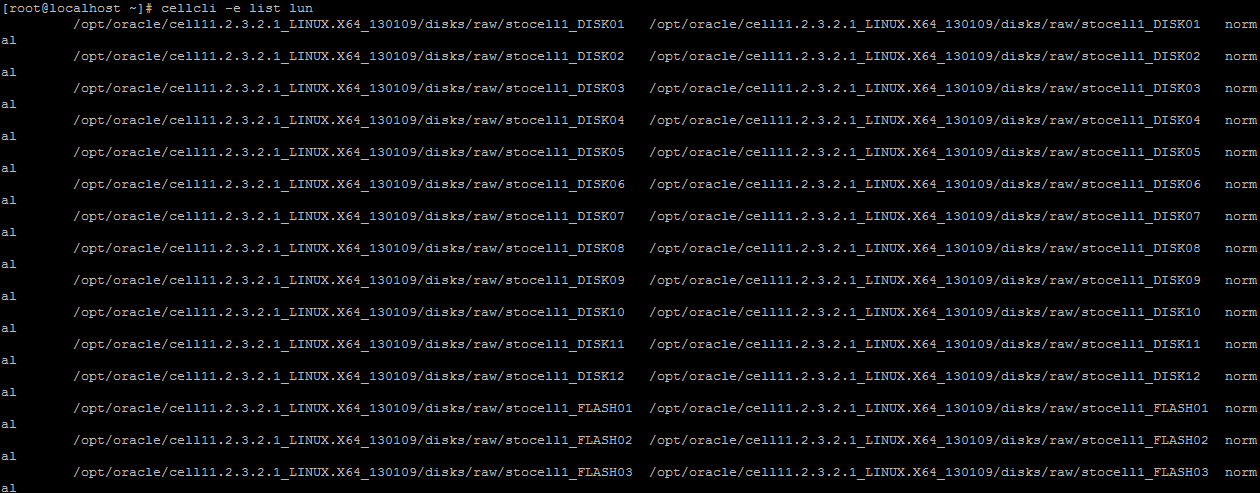
cellcli -e list lun
+ To know all the Hard disk(Grid Disk) lun in Exadata
cellcli -e list lun where disktype = harddisk

Thursday, 10 July 2014

Oracle 11gr2 installation in standalone grid Exadata


Oracle 11gr2 installation in Exadata standalone grid follow's
Continue from
Part-3: Installation of Oracle 11gr2 database.
As oracle user start the DB installation.